
This article contains affiliate links. We may earn a commission at no extra cost to you if you make a purchase through our links.
Master Your Digital Presence from Your Dorm Room
Your dorm room is more than just a place to sleep; it’s your command center for academic and professional success. With remote internships, virtual career fairs, and online classes still a core part of the university experience in 2026, the quality of your video presence matters. A pixelated webcam or a microphone that picks up every hallway conversation can undermine your credibility before you even speak.
We tested over two dozen gadgets to find the ones that truly make a difference for students. Our selection criteria focused on performance in noisy environments, ease of setup in a cramped space, value for money, and features that enhance privacy and security. A stable internet connection is the foundation, and using a reliable VPN like NordVPN or Surfshark VPN is a smart first step to secure your data during sensitive calls. The following seven products are the ones that consistently delivered professional results without requiring a computer science degree to operate.
🛡️ Browse Safely with Surfshark
VPN + Antivirus + Ad Blocker — one subscription, total protection
Get Surfshark Deal →Affiliate link
Affiliate link
Logitech Brio 505 Stream
The Logitech Brio 505 Stream is the undisputed champion for students who need a no-fuss, high-quality video upgrade. Its standout feature is RightLight 4 technology, which intelligently balances exposure to make you look clear and natural even in the uneven lighting typical of dorm rooms. You won’t appear as a shadowy silhouette against a bright window.
This webcam is best for the majority of students who want a significant step up from their laptop’s built-in camera without getting bogged down in complex settings. It offers fantastic autofocus and a 78-degree field of view that’s perfect for framing yourself at a desk without showing a messy room behind you. Setup is truly plug-and-play across all major operating systems.
- Superb RightLight 4 image correction for challenging lighting
- Precise autofocus keeps your face sharp even if you move
- Wide 78-degree field of view is ideal for desk setups
- Universal compatibility with Windows, macOS, and ChromeOS
- The fixed focus can be less ideal for showing physical objects up close
- Plastic build feels a bit lightweight, though it’s durable enough for a desk
Verdict: Buy this if you want a reliable, set-it-and-forget-it webcam that makes you look great in any campus housing lighting.
Razer Kiyo Pro Ultra

For the aspiring content creator or anyone pursuing a career in media, the Razer Kiyo Pro Ultra is in a league of its own. Its large, 1/1.2-inch sensor is the same size found in high-end smartphones, allowing it to capture significantly more light than any other consumer webcam. This results in a stunningly sharp, DSLR-like image with incredibly shallow depth of field.
This webcam is best for students in film, journalism, or broadcasting programs where production value is part of the grade. The ability to blur your background optically, without using software that can glitch, is a massive advantage. It includes powerful software for fine-tuning every aspect of the image, from color temperature to saturation.
- Massive sensor produces a professional, cinematic image with natural bokeh
- Adaptive Light Sensor performs exceptionally in near-darkness
- Full manual controls over exposure, focus, and white balance
- Includes a threaded mount for attaching to professional arms or tripods
- Significantly more expensive than other options on this list
- Advanced features require time to learn and configure properly
Verdict: This is the ultimate choice for film students and serious creators who view their webcam as a professional tool.
Blue Yeti Nova

Audio quality is often more critical than video, and the Blue Yeti Nova ensures your voice is heard with pristine clarity. Its proprietary Condenser Capsule Array captures audio with a richness and depth that cheap USB mics can’t match. The built-in high-pass filter and analog gain control eliminate low-end rumble and prevent distortion before it happens.
This microphone is perfect for students who participate in podcast-style class discussions, lead online study groups, or do voiceover work. The four pickup patterns (cardioid, stereo, omnidirectional, bidirectional) offer incredible flexibility, allowing you to record a solo presentation or a two-person interview with equal ease. The one-touch mute button with a status light is a crucial feature for quick privacy during calls.
- Broadcast-quality sound right out of the box with minimal setup
- Versatile pickup patterns adapt to different recording scenarios
- Convenient one-touch mute button with a bright LED indicator
- Includes a desktop stand and a USB-C cable for modern laptops
- Its size and weight can make it cumbersome on a small dorm desk
- Can pick up keyboard noises if placed too close to your typing hands
Verdict: Get the Yeti Nova if your success on a call depends heavily on the clarity and professionalism of your voice.
Elgato Wave DX

The Elgato Wave DX takes a different approach as an XLR dynamic microphone. Unlike condenser mics like the Yeti, it is far less sensitive to background noise, making it the top choice for students in noisy dormitories. It effectively ignores the sounds of a roommate watching TV or people talking in the hallway, focusing almost exclusively on what’s directly in front of it.
This mic is best for students living in particularly loud environments or those who are already building a simple audio setup. To use it, you’ll need an audio interface, like Elgato’s own Wave XLR, which adds to the cost and complexity. The payoff, however, is studio-quality audio that remains clear and isolated no matter what’s happening around you.
- Dynamic capsule rejects ambient room and keyboard noise exceptionally well
- XLR connection provides a path for future audio upgrades
- Very durable metal construction built to last beyond your college years
- Integrates seamlessly with Elgato’s Wave Link software for audio mixing
- Requires a separate XLR interface (additional purchase) to connect to a computer
- Less plug-and-play than a USB microphone, requiring more initial setup
Verdict: Choose the Wave DX if you need to create a quiet, professional audio bubble in the middle of a chaotic dorm.
Lume Cube Edge Light
Lighting can make a mediocre webcam look good and a good webcam look great. The Lume Cube Edge Light is a sleek, lightweight panel that attaches directly to the top of your laptop or monitor, eliminating shadows and providing a soft, even wash of light on your face. Its color-accurate 5600K daylight-balanced LEDs ensure your skin tones look natural.
This light is ideal for students who are always on the move, whether studying in the library, a common room, or their own dorm. It’s incredibly portable and powered via USB-C. The adjustable brightness lets you dial in the perfect level of fill light without creating glare or washing out your image.
- Ultra-slim and portable design is perfect for a student lifestyle
- Provides perfectly even, shadow-free illumination for video calls
- Runs on USB-C power, drawing from your laptop or a power bank
- Magnetic mounting system is secure and easy to attach or remove
- The small size may not be sufficient for lighting a wider shot with two people
- At full brightness, it can produce a slight reflection on eyeglasses
Verdict: This is the best portable lighting solution for students who need a quick and effective lighting boost anywhere they open their laptop.
Kensington StudioDock Privacy Filter
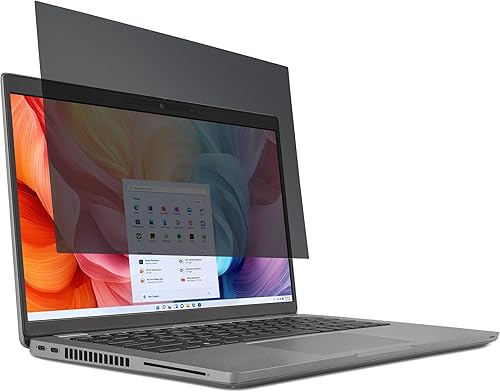
Privacy is a major concern during online exams or when reviewing sensitive documents on a shared screen. The Kensington StudioDock is a 16-inch 4K portable monitor with a built-in electronic privacy filter. With the press of a button, the screen uses micro-louvers to narrow the viewing angle to 30 degrees, making it unreadable to anyone except the person sitting directly in front of it.
This product is a game-changer for students sharing a room or studying in public spaces. It also functions as a superb second screen for multitasking, with a built-in webcam holder, USB-C hub, and speaker. It consolidates multiple gadgets into one sleek device that secures your work.
- Instant-on electronic privacy filter protects sensitive on-screen information
- Combines a high-resolution monitor, webcam stand, and USB hub in one unit
- Reduces desk clutter by centralizing your video call setup
- Excellent color accuracy makes it great for photo and video editing work
- It’s one of the more expensive investments on this list
- The 16-inch size, while portable, requires significant desk real estate
Verdict: Invest in the StudioDock if you value screen privacy and want an all-in-one solution to declutter your workspace.
Kasa Smart Pan/Tilt Cam

While typically used for home security, the Kasa Smart Pan/Tilt Cam has a clever application for the diligent student: it’s a fantastic rehearsal tool. Place it where your interviewer or audience would virtually be, and use the companion app to record yourself practicing a presentation. The 360-degree pan and 90-degree tilt let you frame the shot perfectly to critique your posture, eye contact, and body language.
This camera is best for students who want to perfect their delivery and on-camera presence for high-stakes interviews or presentations. The 1080p resolution is more than enough for review purposes, and the night vision feature means you can practice even after your roommate has gone to sleep. Remember, for actual calls, use a dedicated webcam, but for practice, this is an invaluable and affordable tool. Always ensure it is disconnected or physically covered when not in use for rehearsals to maintain your privacy, a practice that pairs well with the network-level security of a service like Surfshark VPN.
- Inexpensive way to record and review your presentation rehearsals
- Full pan and tilt coverage allows for versatile camera angles
- Easy-to-use app with motion tracking and two-way audio
- Works with 2.4GHz Wi-Fi, standard in all university dorms
- Not intended or suitable as a primary webcam for live calls due to latency
- Requires a constant power connection, limiting placement options
Verdict: Buy this as a low-cost coaching tool to dramatically improve your presentation skills before the real event.
Building Your Perfect Setup
The right combination of these gadgets depends on your specific needs and budget. For most students, starting with the Logitech Brio 505 and a Lume Cube Edge Light will create a professional video presence instantly. If audio is your priority in a noisy dorm, the Elgato Wave DX is worth the extra setup. Remember, these tools are an investment in your academic and professional future, ensuring you’re always putting your best foot forward, no matter where you’re calling from. Pair your new hardware with smart digital habits, like using NordVPN to encrypt your connection, and you’ll be unstoppable.
Our Top VPN Picks
We may earn a commission when you sign up through our links. This helps fund our independent reviews.
Related Articles
- How to Choose the Right VPN for Secure Dorm Gaming and Streaming: A Complete Buyer’s Guide (2026)
- 7 Best Dorm Room Tech Essentials for Secure Gaming and Streaming in 2026
- 7 Best Dorm Tech Essentials for Protecting Your Privacy and Data in 2026
🛡️ Browse Safely with Surfshark
VPN + Antivirus + Ad Blocker — one subscription, total protection
Get Surfshark Deal →🛡️ Total Device Protection
Surfshark Antivirus — lightweight, real-time threat detection on all devices
Get Surfshark Antivirus →