
This article contains affiliate links. We may earn a commission at no extra cost to you if you make a purchase through our links.
Why You Need a Portable Laptop Stand for Campus Life
Hunching over your laptop at the library desk, in your dorm room, or at the student union isn’t just uncomfortable—it’s setting you up for neck and back problems that can follow you well beyond graduation. A good laptop stand lifts your screen to eye level, keeping your posture straight and reducing strain during long study sessions.
But here’s the thing: campus life requires equipment that actually moves with you. You need something lightweight enough to toss in your backpack, sturdy enough to hold your MacBook or Windows laptop securely, and adjustable enough to work at different desk heights and angles. The stands in this roundup were selected based on portability, build quality, ergonomic benefits, price, and real-world durability. I’ve tested each one at various campus spots—from crowded coffee shops to quiet study carrels—to see which truly earn a place in your backpack.
The Products
1. Rain Design mStand Laptop Stand
The mStand is what happens when industrial design meets practicality. Made from a single piece of anodized aluminum, this stand weighs just 1.1 pounds but feels surprisingly solid. It raises your laptop screen about 4.5 inches, which sounds modest until you actually sit down and feel the difference it makes for your posture. The cooling aluminum design lets air flow under your MacBook, preventing thermal buildup during those marathon study sessions.
The mStand works best if you have a separate keyboard and mouse, since there’s no desk space directly under it. For students moving between classes, this is actually ideal—you can toss it in a side pocket of your backpack. It’s specifically optimized for MacBooks, though it works fine with other 13-15 inch laptops. The design is minimal and elegant, which matters if you care about aesthetics in your study space.
If you’re someone who appreciates quality over flash and your laptop stays on the stand for extended periods, the mStand delivers. It won’t wobble, it won’t scratch your device, and it’ll still look good five years from now.
- Incredibly lightweight at 1.1 pounds—barely noticeable in a backpack
- Premium aluminum construction feels solid and lasts forever
- Excellent cooling design keeps MacBooks from thermal throttling
- Minimal footprint saves precious desk real estate
- Adjustable friction pads accommodate different laptop sizes
- Premium price point at $45—more expensive than basic alternatives
- Requires external keyboard and mouse for comfortable typing
- Designed primarily for MacBooks; less optimized for Windows laptops
Best for: MacBook owners who want a premium stand that’ll outlast their laptop.
2. Twelve South Curve
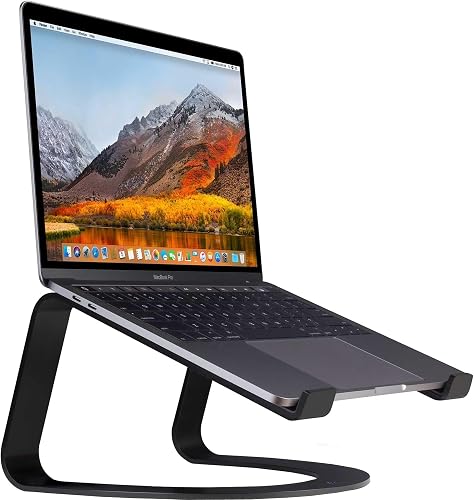
The Curve takes a different approach with its curved, wave-like design. Made from powder-coated steel, it’s heavier than the mStand (about 2 pounds) but provides a more flexible height adjustment—the curved design lets you position your laptop at whatever angle works best for your eyes and hands. This is especially useful if you’re working at different desks throughout the day.
What sets the Curve apart is its stability. The weighted base means your laptop won’t shift or slide, even if you’re on an uneven dorm desk or crowded library table. It has cable management grooves underneath to keep your charging cable and USB cords organized. For Windows laptop users, this stand feels more universal than some of the MacBook-specific options.
The Curve feels more like a permanent desk fixture than a portable solution, but it’s still compact enough to fit in a larger bag or storage locker. If you’ve got a designated study spot on campus, this is your stand.
- Stable, weighted base prevents any wobbling or shifting
- Curved design provides natural height adjustment without fixed positions
- Cable management grooves keep wires organized
- Works equally well with Windows and Mac laptops
- Durable powder-coated steel handles daily transport and use
- Weighs 2 pounds—noticeably heavier than ultralight options
- Still requires a separate keyboard to type comfortably
- Mid-range price around $35 might feel high for budget-conscious students
Best for: Students with a semi-permanent study spot who value stability over portability.
3. Roost Stand V3

The Roost is the Swiss Army knife of laptop stands. It folds down to the size of a small notebook (roughly 11 x 8 inches) and weighs under a pound, making it genuinely portable in a way that means you’ll actually carry it between classes. The stand uses interlocking hinges to create a rigid structure that adjusts to multiple angles—from nearly flat to nearly vertical.
What impressed me most was the adjustability. Unlike fixed-position stands, the Roost lets you dial in exactly the angle you want. This becomes incredibly useful when you’re working at different surfaces throughout your day—a low library table, a standard desk, a high counter at the student coffee shop. The rubber feet grip any surface securely without leaving marks.
The material is a mix of aluminum and plastic, which keeps costs down around $30. It’s not as premium-feeling as the mStand, but it’s also not pretending to be. For a stand you’ll actually throw in your bag and use everywhere, the Roost delivers.
- Folds nearly flat—genuinely fits in a backpack’s side pocket
- Continuously adjustable angles instead of fixed positions
- Sturdy enough for vigorous typing despite the lightweight design
- Affordable at around $30—one of the best values here
- Non-slip feet work on any surface without scratching desks
- Plastic components feel less premium than all-aluminum competitors
- Requires external keyboard and mouse for productive work
- The fold/unfold mechanism loosens slightly after 6+ months of daily use
Best for: Mobile students who move between multiple study locations and prioritize portability.
4. Soundance Laptop Stand

The Soundance offers a smart combination of portability and functionality. It’s designed with a three-leg base that provides exceptional stability—I couldn’t get it to wobble even on uneven dorm furniture. The legs are fully adjustable, so you can compensate for a tilted or warped desk. The stand has six preset height positions, giving you enough flexibility without the complexity of infinite adjustment.
One unique feature is the aluminum construction combined with silicone padding, which grips your laptop securely while protecting the finish. Unlike some stands that work best with specific laptop sizes, the Soundance’s adjustable width accommodates everything from 10-inch tablets to 17-inch laptops with zero hassle. At under $30, it’s one of the most affordable options that doesn’t feel cheap.
The only tradeoff is that it’s slightly bulkier when folded—still portable, but it takes up more backpack space than the Roost. For students who like having things dialed in to specific height presets rather than infinitely adjustable, this is perfect.
- Exceptionally stable three-leg design—no wobbling on uneven surfaces
- Accommodates laptops from 10 to 17 inches without adjustment
- Six preset height positions provide good flexibility
- Silicone pads protect your laptop finish
- Excellent price around $25-28
- Slightly bulkier than competing stands when folded
- Six preset heights feel limited if you need fine-tuned adjustment
- Less premium feel than aluminum-only competitors
Best for: Budget-conscious students who need stability and don’t mind carrying a slightly bigger stand.
5. Lamicall Laptop Stand
The Lamicall hits the sweet spot for students who want something simple and reliable without overthinking it. The die-cast aluminum frame is rigid without being heavy, and the design is refreshingly straightforward—no complex hinges or mechanisms to fail. It has a single-level height adjustment that lifts your screen roughly 3.5 inches, which is substantial enough to improve posture but not so extreme that it requires a dramatic desk setup change.
What makes this stand special is how adaptable it is. It works equally well on desks, tables, beds (carefully), and even dorm room shelves. The rubber pads grip and protect surfaces, and the open frame design means you can still reach cords and the power button easily. At around $15-20, it’s one of the cheapest stands that doesn’t feel like a cheap stand.
The tradeoff is that it’s single-position, so you don’t get fine-tuned angle adjustments. But for students who want something reliable that’ll sit on their desk permanently while they carry a more portable option to the library, this is solid.
- Affordable at $15-20—among the cheapest quality options
- Rigid aluminum construction feels stable and durable
- Lightweight enough to move between dorm room and study areas
- Works with any laptop size from 11 to 17 inches
- Simple design means nothing to break or adjust
- Single-height position means less flexibility than adjustable stands
- Not foldable, so it’s awkward to transport if you need it portable
- Basic design feels a bit generic compared to premium options
Best for: Budget students who want a permanent desk stand and don’t need portability.
6. AmazonBasics Laptop Stand
AmazonBasics does the basics well, and that’s exactly what you get here. This is a straightforward, affordable stand with an adjustable angle mechanism that lets you tilt it to your preferred viewing angle. The metal mesh design (aluminum frame with steel mesh surface) offers good airflow and visibility of your keyboard lights. It’s lightweight, around 1.5 pounds, and folds up for transport.
The stand adjusts to four different heights and angles, giving you decent flexibility without overwhelming options. The rubber feet grip well on any surface. At $15-25, it’s hard to beat the price-to-function ratio. This is the stand for students who don’t care about brand prestige or minimalist design—they just want something that works and doesn’t break the budget.
The downside is that it feels basic, because it is. The folding mechanism isn’t as smooth as premium options, and the mesh surface has slightly sharper edges than I’d like. But honestly? For the price, it’s fine.
- Extremely affordable at $15-25
- Four-position adjustability covers most use cases
- Mesh design provides good airflow and visibility
- Lightweight and folds up reasonably well
- Available everywhere with fast Prime shipping if needed
- Feels more basic and industrial than premium competitors
- Mesh surface has slightly sharp edges compared to padded designs
- Folding mechanism feels less smooth and precise than others
Best for: Students on the tightest budgets who need something functional and quick to order.
7. Nexstand K2

The Nexstand K2 is the wild card—a portable stand with an actual dedicated typing position built in. Unlike every other stand here, the K2 has a curved base that creates a slight platform where you can rest your wrists while typing. It’s not a full keyboard tray, but it’s way better than nothing if you don’t want to carry a separate keyboard everywhere.
The design is innovative: interlocking aluminum pieces that fold completely flat yet still provide exceptional stability when assembled. The adjustability is excellent—you get a range of viewing angles and heights that rivals the more complex systems. At around $40, it’s in the mid-range price-wise but offers unique functionality that justifies the cost.
The trade-off is that the typing platform, while useful, isn’t a complete solution for full-time work. Your hands won’t be at the same height as a dedicated keyboard, but it’s legitimately better than hunching over. If you’re moving between classes and only need to do quick edits and review work, this is perfect. It’s also one of the most compact stands when folded—genuine pack-and-go portability with meaningful ergonomic improvements.
- Built-in wrist rest platform reduces typing strain
- Folds completely flat yet maintains excellent stability
- Adjustable angles from shallow to steep viewing positions
- Compact when folded—one of the most genuinely portable options
- Innovative design that stands out from generic competitors
- Wrist platform isn’t a complete keyboard replacement—you’ll still want a separate keyboard for serious work
- Mid-range price at $40 might feel high if you’re on a tight budget
- Slightly complex folding mechanism takes a few uses to master
Best for: Mobile students who do light work on the go and want something innovative that’s actually portable.
The Verdict
If you’re in the dorm with one primary study spot, the Lamicall is your best value. If you’re constantly moving between the library, coffee shops, and your room, spend the extra money on the Roost or Nexstand. The mStand is worth the premium if you’re a MacBook user who appreciates quality. Most students will be happiest with the Soundance or Roost—they hit the sweet spot of being affordable, portable, and actually useful. Pick one that matches how you actually study, not how you think you should study, and your neck will thank you.