
This article contains affiliate links. We may earn a commission at no extra cost to you if you make a purchase through our links.
Why Tablets Matter for College Note-Taking
Switching from paper notebooks to a tablet can transform how you study. Digital notes sync across devices, you can search instantly, and you’ll have access to more tools than traditional pen and paper. The right tablet eliminates the need to carry multiple notebooks while keeping your hands free during lectures.
We evaluated seven tablets based on screen size, stylus performance, battery life, price, and how well they integrate with common note-taking apps like GoodNotes, OneNote, and Notability. We prioritized devices that handle handwriting with minimal lag and offer enough screen real estate to capture detailed diagrams without constant scrolling.
Here are the tablets that actually deliver for college students.
1. iPad Pro 12.9″ (M4)

The 12.9-inch iPad Pro is the gold standard for note-taking. The M4 chip provides more processing power than most laptops, and the screen is large enough to write across without feeling cramped. The Apple Pencil Pro adds haptic feedback when you write, making it feel closer to real pen and paper than competing styluses.
The OLED display renders handwriting with exceptional clarity, and you can split-screen between your notes and a textbook PDF. Battery life consistently exceeds 15 hours of heavy use, so you’ll get through a full week of classes without charging. The tablet pairs seamlessly with your iPhone and Mac if you already use Apple products.
You’ll pay a premium—the 256GB model costs around $1,200—but the build quality and software integration justify it for students planning to keep the device through graduation and beyond.
- OLED display with zero ghosting, crisp handwriting rendering
- Magnetic attachment and wireless charging for Apple Pencil Pro
- M4 handles video editing and heavy multitasking without lag
- 15+ hour battery life on a single charge
- Excellent resale value after 2-3 years
- Expensive upfront investment ($1,200+)
- iPadOS limits file management compared to desktop operating systems
- Heavy at 1.3 pounds if you’re carrying it all day
Verdict: Best for students with a full Apple ecosystem who prioritize screen quality and can justify the premium price.
2. iPad Air 11″
The 11-inch iPad Air offers 90% of the iPad Pro experience at 60% of the cost. The M2 chip is more than capable for any college task, and the 11-inch display is genuinely portable—easier to fit in a standard backpack than the 12.9 Pro. The Apple Pencil (USB-C) works almost as well as the Pro’s stylus for note-taking, though without the haptic feedback.
You get the same excellent software ecosystem as the Pro, with access to Notability, GoodNotes, and other note-taking apps. The 7-hour battery easily covers a full day of classes. The main tradeoff is the LCD screen instead of OLED, which matters less for text and handwriting than for watching videos.
At around $600 for the base model, this tablet offers the best value if you want a genuine iPad with reasonable battery life and a stylus that doesn’t feel like a toy.
- Lightweight at 1 pound, fits most backpacks
- M2 chip runs any app smoothly without compromise
- Apple Pencil (USB-C) included in most bundles
- Solid 7-hour battery life for all-day use
- $600 price point is genuinely accessible
- LCD screen lacks the OLED pop, especially for note margins
- 11-inch screen can feel small when reviewing detailed diagrams
- No magnetic pencil attachment like the Pro models
Verdict: Best for budget-conscious Apple users who want a reliable tablet without paying for overkill specs.
3. Samsung Galaxy Tab S10 Ultra
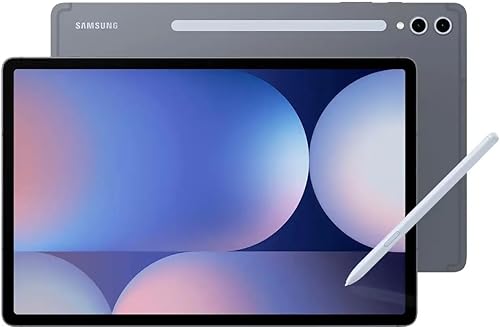
Samsung’s Ultra is the best Android tablet for note-taking. The 14.6-inch screen is genuinely massive—more like a small laptop—and the S Pen stylus has lower latency than most competitors, making handwriting feel immediate and responsive. The 120Hz refresh rate makes scrolling smooth, and you can use the tablet in desktop mode when docked.
The AI features in OneNote and handwriting-to-text conversion work well once you adjust your handwriting. Battery life hits 14 hours easily, and Samsung’s multitasking mode lets you split the screen into three separate windows simultaneously. The OLED display is brilliant, though the brightness outdoors isn’t quite as strong as the iPad Pro.
The $1,100 price puts it in iPad Pro territory, but the larger screen and stylus hardware make it compelling if you’re already in the Android ecosystem or prefer USB-C and file management flexibility.
- Massive 14.6-inch display ideal for complex note layouts
- S Pen with 0.6mm tip provides precision handwriting
- Split-screen supports three apps simultaneously
- 120Hz refresh rate feels buttery smooth
- DeX mode connects to monitor for desktop-like experience
- Runs Android, not iPadOS—fewer native note-taking apps optimized
- Handwriting recognition inconsistent with cursive or non-standard writing
- Screen reflectivity can be challenging in bright classrooms
Verdict: Best for Android users who want a desktop alternative and prioritize sheer screen size.
4. Microsoft Surface Go 4

The Surface Go 4 runs full Windows, which appeals to engineering and CS majors who need access to desktop software. The 10.5-inch display is adequate, and the optional Surface Pen (sold separately at $120) is solid for note-taking. You can install Microsoft Office, specialized engineering tools, and any software from the web without restrictions.
The trade-off is performance: the Intel Pentium processor isn’t fast, and you’ll notice slowdowns when running multiple heavy applications. Battery life sits around 9 hours in ideal conditions, closer to 7 hours with real workloads. The screen isn’t as bright as tablet competitors, and the 8GB RAM feels tight in 2026.
This tablet makes sense if your major requires specific Windows software. If not, it’s not competitive with the iPad Air or Galaxy Tab for pure note-taking.
- Runs full Windows 11, no app restrictions
- Works with any USB peripheral—mice, storage, printers
- Surface Pen support for OneNote and Drawboard PDF
- Kickstand built into the device
- Around $500 makes it affordable if you need Windows
- Pentium processor creates noticeable lag switching apps
- 9-hour battery is adequate but not exceptional
- Surface Pen sold separately adds $120 to the cost
Verdict: Best for engineering and computer science students who need Windows software and can tolerate modest performance.
5. Lenovo Tab P12 Pro Gen 2
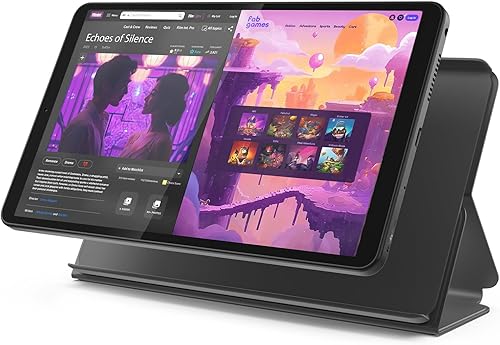
The Tab P12 Pro Gen 2 is the value tablet for note-taking. At $600, you get a 12.4-inch OLED screen that rivals the iPad Pro visually, and the Lenovo Precision Pen 3 (included) has impressive latency and pressure sensitivity. The tablet runs Android 14 with a clean interface, and productivity apps work well thanks to the large screen.
The Snapdragon processor handles multitasking smoothly, and battery life reaches 12+ hours. The kickstand is included in the box, unlike some competitors. The main limitation is software: fewer specialized note-taking apps are optimized for Android compared to iPadOS or Windows, and handwriting-to-text conversion is less reliable.
If you’re price-sensitive and don’t need Mac integration, this delivers serious value. The OLED screen alone is worth the price, and the stylus is genuinely good.
- OLED screen quality matches iPad Pro at half the price
- Included Precision Pen 3 with pressure sensitivity
- Built-in kickstand is useful for study sessions
- 12+ hour battery gets you through 3-4 days of classes
- $600 price is genuinely competitive
- Android note-taking apps trail iOS offerings
- Handwriting recognition less accurate than Apple or Samsung
- Lower software optimization for Lenovo devices overall
Verdict: Best for budget-conscious students who value OLED screen quality and don’t require Mac integration.
6. iPad mini (7th Generation)
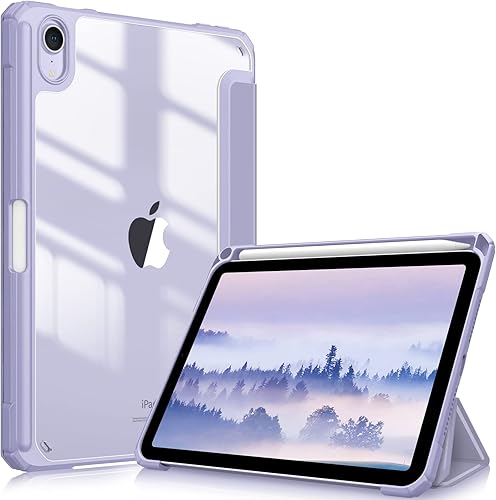
The iPad mini is the most portable tablet here at just 8.3 inches. It’s genuinely pocketable—you can carry it between classes without a backpack—and it weighs only 9 ounces. The A17 Pro chip is fast enough for anything you’ll do in college, and it pairs with the Apple Pencil Pro just like the larger iPads.
The small screen is the obvious trade-off. You’ll scroll more when reviewing notes, and diagrams become tight on a 8.3-inch display. But if you’re moving between classes constantly and don’t want to carry a large device, the iPad mini solves a real problem. Battery life is excellent at 12+ hours, and the $499 starting price is reasonable for an Apple tablet.
This works best if you’re taking mostly text notes and don’t need to see large diagrams all at once.
- Extremely portable at 9 ounces and 8.3 inches
- A17 Pro chip provides 3+ years of future-proofing
- Fits in jacket pockets unlike larger tablets
- Excellent 12+ hour battery life
- Supports Apple Pencil Pro for handwriting
- 8.3-inch screen is cramped for chemistry, math, or engineering diagrams
- Scrolling through notes is more frequent than larger devices
- Split-screen multitasking is limited on the small display
Verdict: Best for minimalist students who prioritize portability over screen real estate.
7. OnePlus Pad 2

The OnePlus Pad 2 offers solid Android performance at a mid-market price. The 11.6-inch AMOLED screen is vibrant, the OnePlus stylus is responsive with 10,000 pressure levels, and the Snapdragon processor handles note-taking apps without strain. Battery life reaches 13+ hours, and charging is fast if you have a USB-C power adapter.
The design is clean and minimalist, and the tablet doesn’t push OxygenOS bloatware onto you—it’s genuinely uncluttered. However, the stylus (sold separately at $80) adds to the cost, and Android’s note-taking app ecosystem remains weaker than iOS. The screen is sometimes too bright in dark environments, and there’s no native pressure response in all apps.
This is a solid choice if you want Android, prefer clean software, and don’t want to pay flagship prices. It’s not as polished as the iPad Air or Galaxy Tab, but it’s honest value.
- AMOLED screen with excellent contrast and color accuracy
- Clean OxygenOS with minimal bloat or ads
- Responsive stylus with 10,000 pressure levels
- 13+ hour battery easily handles full days
- $349 base price is genuinely affordable
- Stylus sold separately for additional $80
- Android apps don’t optimize for note-taking as well as iOS
- Screen brightness can be too high in dim environments
Verdict: Best for Android users who want clean software and strong specs at an affordable price.
Final Recommendation
For most college students, the iPad Air 11″ offers the best combination of price, performance, and software. It costs $600, runs every quality note-taking app, and you’ll actually want to carry it. If budget is tight, the OnePlus Pad 2 or Lenovo Tab P12 Pro deliver surprising value. If you’re already locked into Apple, the iPad mini sacrifices screen size for portability. The iPad Pro and Galaxy Tab are overkill for notes alone but justify themselves if you edit video or need desktop software alongside your coursework.